



1.1 Product Overview
This chapter describes the integration process for GatePay Subscription Payments and helps merchants complete the full end-to-end flow from product creation and subscription plan configuration to order generation and debit management.1.2 Core Flow
Subscription Payments is GatePay’s recurring billing solution, designed for scenarios such as membership services and SaaS services that require periodic charges. The end-to-end flow is divided into five stages:- Product Preparation: Create and manage subscription products and their pricing information
- Plan Configuration: Configure billing cycle, trial period, billing count, and other rules
- Order Creation: Generate a subscription order and obtain an authorization link
- User Authorization: After the user completes authorization, the billing cycle begins
- Recurring Billing: The system automatically performs charges according to the configured cycle
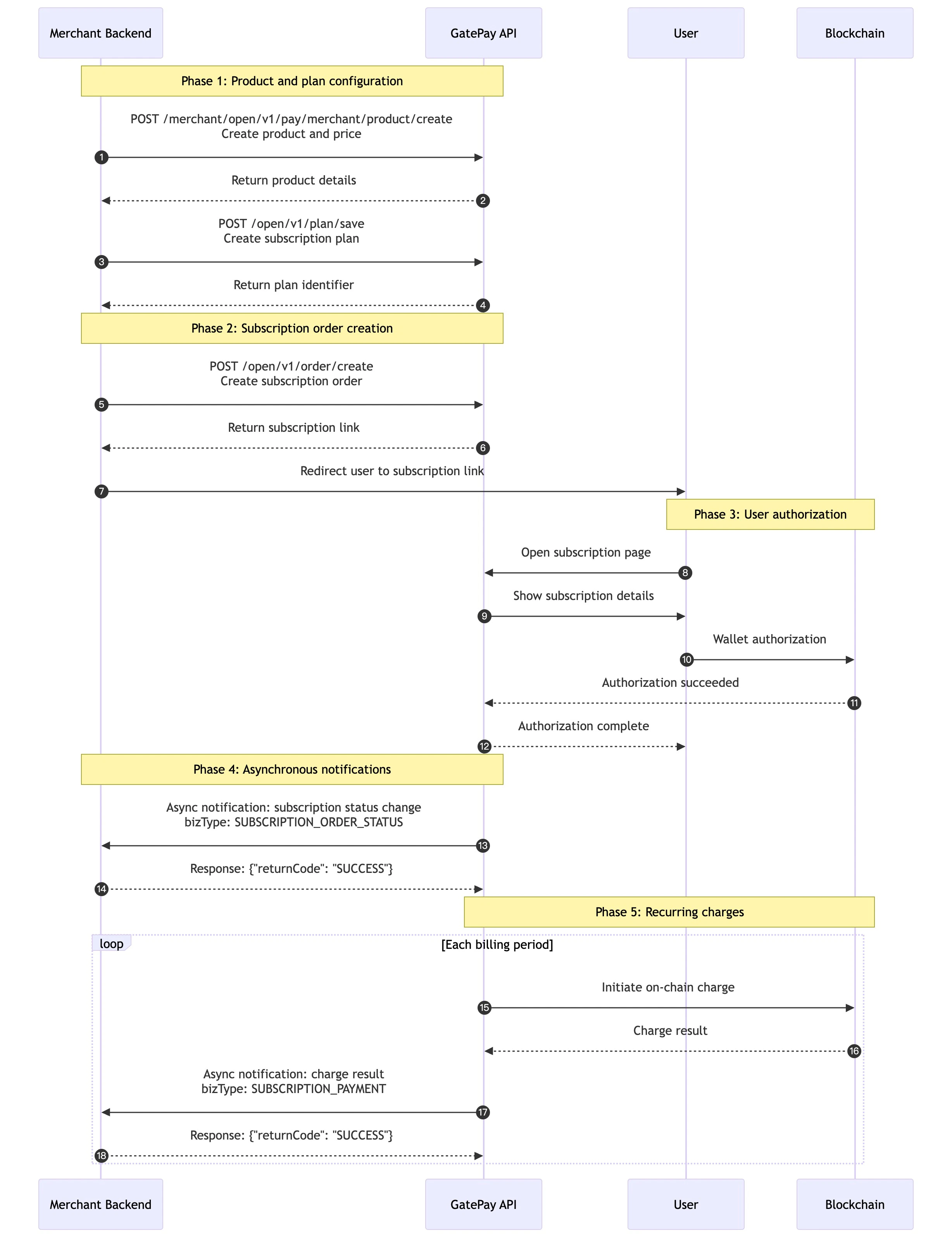
1.3 Merchant Integration Steps
1.3.1 Configure Products and Plans
- The merchant must call POST /merchant/open/v1/pay/merchant/product/create to create product information and pricing. After that, call POST /open/v1/plan/save to create a subscription plan and associate it with the corresponding price ID.
1.3.2 Create a Subscription Order
- When the user confirms the purchase, the merchant backend calls POST /open/v1/order/create to create a subscription order. The API returns a subscriptionLink subscription page URL.
1.3.3 Guide the User to Authorize
- After the merchant frontend receives subscriptionLink, redirect the user to this URL to guide them through subscription authorization.
1.3.4 Get Subscription Status
- Authorization and billing status are mainly obtained through GatePay asynchronous notification messages. The merchant can also call GET /open/v1/order/detail to query subscription details as a fallback confirmation.
1.4 FAQs
Q: How long is a subscription order valid? A: A subscription order itself does not have a fixed expiration time. It automatically ends according to the configured totalPayCount (number of debits) or endTime (end time). If neither is configured, it is treated as a long-term subscription. Q: How do I set a trial period? A: Set the number of trial days using the trialDays parameter when creating a subscription plan. No debit will be executed during the trial period, and the first debit starts immediately after the trial period ends. Q: How do I configure a first-period discount? A: Configure promoConfigType when creating product pricing:- FIX_AMOUNT: Set promoAmount to the discounted amount for the first period
- RATE: Set promoRate to the first-period discount rate (for example, store 0.1 for a 10% price)
1.5 Order Status Description
| Status | Description |
|---|---|
| CREATED | Subscription order created successfully, awaiting user authorization |
| AUTHORIZED | Authorized, waiting for the first debit |
| TRIAL | In trial period, no debit initiated |
| RUNNING | Running normally, subscription plan has started |
| UNPAID | Pending payment, trial ended or a debit failed during running state, retry limit not reached |
| COMPLETED | Completed, reached the debit count limit, end date, or manually completed |
| CANCELLED | Cancelled, subscription order cancelled by the merchant |
| CLOSED | Closed, abnormal condition such as exceeding the number of failed debit attempts |
| BLOCKED | Blocked, debit was executed but the user’s funds are at risk |